Gravity Speed Run Arcade
Reviews
💡Gravity Speed Run delivers a tight gameplay loop where each mistake teaches you something. The gradual difficulty curve keeps you engaged without feeling unfair. Unlocking robot skins adds a light progression system that motivates replay. It is a polished arcade experience that works well on both mobile and desktop browsers.
Description
Game Introduction
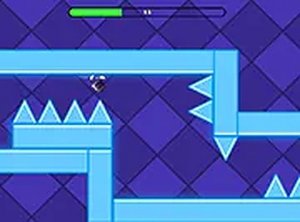
Gravity Speed Run Online Arcade Game is a fast-paced skill-based platformer where players control a small robot navigating a hazardous path. The core mechanic involves flipping gravity to switch between running on the top or bottom of the track. The objective is to avoid deadly spikes and traps while reaching the finish line. Each mistake resets progress, demanding precision and quick reflexes. As players advance, obstacles become more frequent and the pace increases, offering a challenging test of timing and focus.
How to Play
Players control the robot by tapping or clicking to flip gravity. This causes the character to alternate between running along the upper and lower surfaces of the path. Timing is crucial: flips must be executed just before encountering spikes or traps to avoid collision. Each level ends upon reaching the finish line without hitting any obstacles. Coins collected during runs can be used to unlock new skins for the robot from an in-game shop. The game is playable on both mobile and desktop browsers with no downloads required.
Game Features
Key features include gravity-flipping gameplay that creates a unique running mechanic, progressively challenging levels with increasing hazard density, and a coin collection system tied to cosmetic rewards. Players can unlock various robot skins, adding a layer of personalization. The game offers instant browser-based play without installation, supports full-screen mode for an immersive experience, and is free to play online. Its simple controls combined with high difficulty make it suitable for quick sessions or extended practice.
Tips for Success
Master the rhythm of gravity flips by practicing on early levels to build muscle memory. Focus on anticipating upcoming obstacles rather than reacting at the last moment. Collecting coins is beneficial for unlocking skins, but prioritize survival over coin gathering. Take short breaks if frustration builds, as calm reflexes improve performance. Study each level's pattern after a few attempts to memorize trap placements. Finally, adjust your device's screen brightness and reduce distractions to maintain concentration during fast sections.
✅ Compatibility & Testing
Faq
Is this game suitable for children?
Does the game require an internet connection to play?
Can I save my progress or continue from where I left off?
Are there any in-app purchases or hidden costs?
What devices are supported for playing this game?
How many levels or skins are available in the game?
Associated Games
Pirate Spot the Differences
Clean visuals and simple controls. A relaxing puzzle for quick observation training.
Triple Tiles Fruit Match 3 Puzzle
Clean match-3 gameplay with bright fruit tiles. Perfect for quick, relaxing breaks.
Platformer Challenge Arcade Game
Clean design and smooth gameplay. Great for short breaks.
Color Tower Stacking Arcade Game
Simple and addictive stacking game. Great for quick breaks and improving timing skills.
Nubik Dungeon Puzzle Game
Clever puzzles and clean design make Nubik Dungeon a solid choice for puzzle fans. Easy to pick up.
Tung Tung Sahur Rhythm Dash
Catchy rhythm and tight controls make this a fun challenge. Great for quick gaming sessions.
Super Ice Run Arcade Game
Slippery ice and acid obstacles create a fun challenge. Great for quick online matches.
Blast Puzzle Physics Game
Clever physics puzzles with simple controls. Great for quick, thoughtful play sessions.