Two Players, One Keyboard
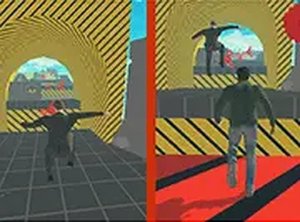
SkyBlock Parkour Duo places two characters on the same screen and the same keyboard. Player one moves with W, A, S, and D, while player two uses the arrow keys. Both players run, jump, and navigate platforms in a shared 3D space. The setup removes the need for controllers or a network connection, so a single computer is enough for two people to play together.
Spinner Collection and Map Progression
The main objective is to collect spinners scattered across platforms. Two colorful maps provide the initial challenge, each with its own layout and obstacle placement. Gathering enough spinners unlocks a night level, which introduces a different visual theme and a fresh set of obstacles. This progression gives players a clear reason to keep collecting rather than simply reaching the end of a course.
Cooperation or Competition
The design supports two approaches. Players can split up to cover more ground and collect spinners faster, or they can race to see who gathers the most. Because both characters share the same screen, each player can see what the other is doing and adjust on the fly. That makes coordination useful but not mandatory, and it lets pairs choose a pace that suits them.
Handling and Difficulty
Jumps require timing. Obstacles and traps can knock a character off a platform, so players need to read each gap before moving. The early sections are straightforward, but the difficulty rises as the maps progress. Simple controls keep the game accessible, while the later platform sequences demand more precise reactions. Regular play improves coordination and reaction speed naturally.
Presentation and Access
Bright 3D graphics give the platforms and spinners clear visual separation, which helps players judge distance during jumps. As a free browser game, SkyBlock Parkour Duo requires no download or installation. That makes it easy to start a session quickly, whether the goal is a short cooperative run or a competitive spinner hunt.

Editorial Notes