Smart Mind Memory Puzzle
Reviews
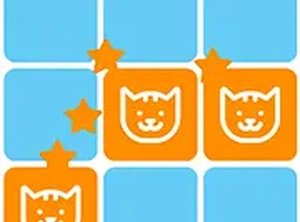
💡Smart Mind Memory Puzzle offers a polished memory matching experience with cute animal illustrations. The difficulty increases gradually, keeping players engaged without frustration. It is ideal for casual play and helps sharpen recall skills. The lack of time limits allows thoughtful gameplay, making it suitable for both children and adults. Replayability is high due to randomized tile arrangements each session.
Description
Game Introduction
Smart Mind Memory Puzzle is a delightful online memory game designed to challenge and improve your cognitive abilities. The core objective is to match pairs of hidden images, typically featuring cute animal faces, by remembering their positions on a grid. As a classic memory puzzle, it offers a relaxing yet stimulating experience suitable for players of all ages. The game is completely free to play directly in your browser, requiring no downloads or installations, making it an accessible choice for quick brain training sessions or longer play periods.
How to Play
Playing Smart Mind Memory Puzzle is straightforward and intuitive. You are presented with a grid of face-down tiles. To start, click on any tile to reveal the image beneath. Then, click on a second tile to try and find its matching pair. If the two images match, the tiles remain open and are collected. If they do not match, both tiles flip back over, and you must remember their positions for future attempts. The game typically tracks your progress through multiple levels, each introducing new arrangements and an increasing number of tiles. There are no time limits, allowing you to play at your own pace and focus on memorization.
Game Features
Smart Mind Memory Puzzle includes several features common to memory games of this type. It offers progressive difficulty, with each level presenting a greater challenge through more tiles or complex layouts. The game uses charming graphics, such as adorable animal faces, to appeal to a wide audience. It provides a form of memory training that can help sharpen recall and attention skills. Being a browser-based game, it offers instant access without any downloads or installations, and it is free to play. The interface is designed for simple mouse clicks, making it easy to pick up and play.
Tips for Success
To excel in Smart Mind Memory Puzzle, focus on developing a systematic memorization strategy. Try to remember the positions of multiple tiles at once rather than just one pair. Some players find it helpful to create a mental map of the grid, associating each tile's location with its image. Practice regularly to improve your memory and speed. Since there are no time limits, take your time to think before clicking. Pay attention to patterns in the tile arrangement, as this can aid recall. Staying calm and maintaining concentration are key to progressing through the increasingly difficult levels.
Compatibility
Faq
Is Smart Mind Memory Puzzle suitable for children?
Do I need to create an account to play?
Can I play Smart Mind Memory Puzzle on my mobile device?
How does the game track my progress?
Is there a way to reset my progress?
What happens if I make a wrong match?
Associated Games
Pirate Spot the Differences
Clean visuals and simple controls. A relaxing puzzle for quick observation training.
Triple Tiles Fruit Match 3 Puzzle
Clean match-3 gameplay with bright fruit tiles. Perfect for quick, relaxing breaks.
Platformer Challenge Arcade Game
Clean design and smooth gameplay. Great for short breaks.

Color Tower Stacking Arcade Game
Simple and addictive stacking game. Great for quick breaks and improving timing skills.
Nubik Dungeon Puzzle Game
Clever puzzles and clean design make Nubik Dungeon a solid choice for puzzle fans. Easy to pick up.
Tung Tung Sahur Rhythm Dash
Catchy rhythm and tight controls make this a fun challenge. Great for quick gaming sessions.
Super Ice Run Arcade Game
Slippery ice and acid obstacles create a fun challenge. Great for quick online matches.
Blast Puzzle Physics Game
Clever physics puzzles with simple controls. Great for quick, thoughtful play sessions.