StickSnatch Reflex Arcade
Reviews
💡StickSnatch delivers a pure reflex challenge that is easy to pick up but hard to master. The minimalist design keeps you focused, while progressive difficulty ensures long-term replayability. Each session feels fresh, and chasing high scores adds a rewarding layer. It is a solid choice for quick mental sharpening.
Description
Game Introduction
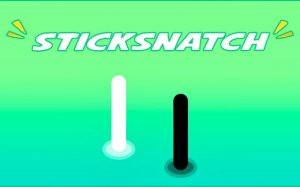
StickSnatch: Reflex Challenge Arcade Game is a hyper-casual arcade game that focuses on testing your reaction speed. The core objective is simple: tap a stick that appears on the screen before it vanishes. This minimalist design strips away all distractions, delivering a pure challenge of hand-eye coordination and mental sharpness. Each session offers a fresh test, making it ideal for quick breaks or competitive score chasing. The game appeals to players of all ages who want to improve their focus and reflexes in a straightforward, addictive format.
How to Play
In each round, a stick graphic appears suddenly on your screen for a brief moment. Your goal is to tap or click on it accurately before it disappears. A successful tap earns a point and advances you to the next round. As you progress, the stick appears for shorter durations and in more unpredictable positions, increasing the difficulty. There are no complex controls or rules—just pure, focused gameplay. Your score reflects your speed and accuracy, motivating you to improve with each attempt.
Game Features
The game features intense reflex testing that challenges your reaction time. Progressive difficulty ensures the game stays engaging as the stick appears faster and in random spots. The minimalist design removes clutter, allowing you to focus solely on the task. A high score chase encourages replayability, and universal accessibility means anyone can play on any device with a tap or click.
Tips for Success
To improve your performance, practice regularly to sharpen your reflexes. Stay focused and avoid distractions during gameplay. Anticipate the stick's appearance by keeping your finger or cursor near the center of the screen. Learn the rhythm of the game to predict timing patterns. Finally, take short breaks to avoid fatigue, as quick reactions require a fresh mind.
Compatibility
Faq
Is StickSnatch free to play?
Can I play StickSnatch offline?
Does StickSnatch have a leaderboard?
What devices support StickSnatch?
Are there different difficulty levels in StickSnatch?
How can I improve my reaction time for StickSnatch?
Associated Games

Pop It Fiesta: Bubble Popping Puzzle
Clean graphics and smooth touch controls. Perfect for quick, satisfying play sessions that improve focus.

Popcorn Burst Puzzle: Casual Tap Game
Charming puzzle game with relaxing ASMR. Perfect for short, calming breaks.

Super Snake Arcade Challenge
Clean design and smooth gameplay. Great for short breaks.

Cookie Match: Sliding Puzzle Game - Puzzle
A clean and engaging puzzle game. Smooth controls and clever level design make it enjoyable for short sessions.
Smiles Puzzle Match Fun
Bright visuals and smooth matching mechanics. Ideal for relaxing breaks.
Charge Now: Plug Socket Puzzle
Simple yet challenging puzzle game with clean visuals and smooth controls. Great for quick play sessions.

Cerkio Timing Ball Arcade
Simple yet addictive timing challenge. Clean design and smooth gameplay make it perfect for quick breaks.

Rotating Colored Boxes Arcade
Bright visuals and smooth controls. A simple yet addictive arcade puzzle game.