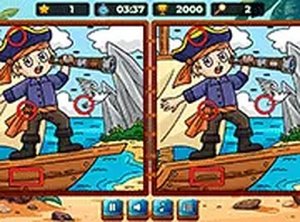
Comparing Two Pirate Scenes
Each level displays two versions of the same pirate illustration side by side. The scenes contain treasure, ships, and islands, and a handful of details have been altered between the two copies. Your job is to identify every change. Clicking or tapping a real difference highlights it and awards points; clicking a spot with no change can cost you time or points. The comparison itself is the whole game — there are no hidden items to collect or characters to control.
How the Timer Shapes Play
A countdown runs on every level. Early scenes give you generous time and fewer differences, so you can scan methodically. Later levels either add more differences or shorten the clock, which forces faster decisions about which areas to check first. Because wrong taps carry a penalty, rushing without a plan usually backfires. The timer turns a static image comparison into a light pressure test of attention and restraint.
Difficulty Progression and Accessibility
The game is designed for all ages and contains no violent content. Difficulty rises gradually rather than through sudden spikes, which suits short casual sessions. Full-screen mode is available for focused play, and the interface works on both touch devices and computers. No registration or download is required, so a session can start directly in the browser.
Approaches That Work
Scanning systematically — top to bottom or left to right — is more reliable than jumping between random spots. Detail-heavy areas such as treasure piles or ship rigging tend to hide changes well, so they deserve a second pass. Taking a short break between levels can help maintain concentration, especially once the timer tightens.






Editorial Notes