Bird Surfing 3D Flying Arcade
Reviews
💡Bird Surfing 3D Flying Game Online is a well-crafted arcade game with realistic flight physics and vibrant graphics. The random ring placements and changing backgrounds give it strong replay value. Controls are responsive, and the difficulty scales naturally as you improve. It is a clean, family-friendly game perfect for short sessions or longer practice runs.
Description
Game Introduction
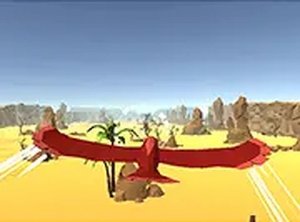
Bird Surfing 3D Flying Game Online Arcade Game is a browser-based arcade game where you control a bird in a three-dimensional world. The core objective is to fly through glowing rings that appear in random positions, testing your timing and precision. The game features realistic physics, so your bird reacts naturally to speed and direction changes. Each ring you pass adds to your score, and the environment changes every session with new landscapes and sky colors, keeping the experience fresh and encouraging replay. With bright, clear graphics, it's easy to spot rings from a distance. Designed for players who enjoy simple controls combined with a challenging flight path, Bird Surfing is suitable for all ages and requires no download—you can start playing instantly on any desktop computer.
How to Play
To play Bird Surfing, use your mouse or keyboard to steer the bird. Move the mouse left, right, up, or down to change direction, and the bird responds immediately. Your objective is to fly through the rings floating in the 3D space. Each ring you pass increases your score. Missing a ring ends your run, so focus on timing and precision. The game starts as soon as you open it, with no menus or setup required. For a better view, click the full screen button to expand the game window. The random location changes mean you must adapt to new ring patterns and backgrounds. Practice helps you improve your control and chain rings together for higher scores. The game is best played on a computer with a stable internet connection.
Game Features
Stunning 3D graphics create immersive environments. Realistic physics make each flight feel responsive. Random locations ensure no two sessions are the same. You can choose from several beautiful bird designs. Full screen mode enhances visibility and focus. The game is free to play with no ads interrupting gameplay.
Tips for Success
Focus on smooth, controlled movements rather than sharp turns to maintain better control of the bird. Practice regularly to improve your timing and learn how the physics affect your flight. Pay attention to the background changes so you can quickly spot new ring patterns. Try to chain rings together by planning your path ahead, which can help you achieve higher scores. Stay patient—missing a ring is part of learning, and each attempt helps you get better.
Compatibility
Faq
Is Bird Surfing free to play?
Can I play Bird Surfing on mobile devices?
What happens when I miss a ring?
Does the game save my high score?
Are there different difficulty levels?
Can I play Bird Surfing with a controller?
Associated Games
Pirate Spot the Differences
Clean visuals and simple controls. A relaxing puzzle for quick observation training.
Triple Tiles Fruit Match 3 Puzzle
Clean match-3 gameplay with bright fruit tiles. Perfect for quick, relaxing breaks.
Platformer Challenge Arcade Game
Clean design and smooth gameplay. Great for short breaks.
Color Tower Stacking Arcade Game
Simple and addictive stacking game. Great for quick breaks and improving timing skills.
Nubik Dungeon Puzzle Game
Clever puzzles and clean design make Nubik Dungeon a solid choice for puzzle fans. Easy to pick up.
Tung Tung Sahur Rhythm Dash
Catchy rhythm and tight controls make this a fun challenge. Great for quick gaming sessions.
Super Ice Run Arcade Game
Slippery ice and acid obstacles create a fun challenge. Great for quick online matches.
Blast Puzzle Physics Game
Clever physics puzzles with simple controls. Great for quick, thoughtful play sessions.