Surviving the Crash Site
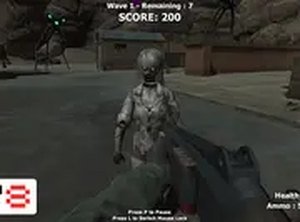
Alien Survival Quest begins with a crash landing on an uncharted planet. Your immediate goal is to stay alive as long as possible while hostile alien creatures attack in waves. The environment is your only ally: you can use it for cover and to break enemy lines of sight. The game does not provide a safe zone, so movement and positioning are constant concerns.
Controls and Combat
You control your character with standard keyboard and mouse inputs on a desktop computer. Movement is handled by the keyboard, while the mouse aims and fires your blaster. Ammunition is limited, so each shot matters. You must monitor both health and ammo while deciding whether to engage or evade. A full-screen mode is available for a more immersive experience.
Escalating Threat Waves
Each wave brings more enemies or tougher variants, gradually increasing the difficulty. The game tests your endurance and reflexes as the pressure builds. There is no downtime between waves to fully recover, so you must adapt your strategy on the fly. Prioritizing which threats to eliminate first becomes critical as the screen fills with creatures.
Tips for Longer Runs
Keep moving to avoid getting cornered. Learn enemy movement patterns to dodge effectively. Conserve ammunition by aiming carefully and using the environment for cover. Staying calm under pressure helps you make better decisions when multiple threats close in. Practice improves your reflexes and helps you adjust to the ever-growing difficulty.





Editorial Notes